Google Ads has moved on a lot in the last twelve months. Most of what looked like defensible best-practice in 2024 is now either the wrong default or the thing every competitor is also doing. I've had to change how I run every account I touch, and the changes aren't optional.
Here are the six shifts I've actually made this year, plus one attribution gap that changes how you should read every number Google shows you. The order roughly reflects biggest ROI first.
Give Google the discovery, take back what to value
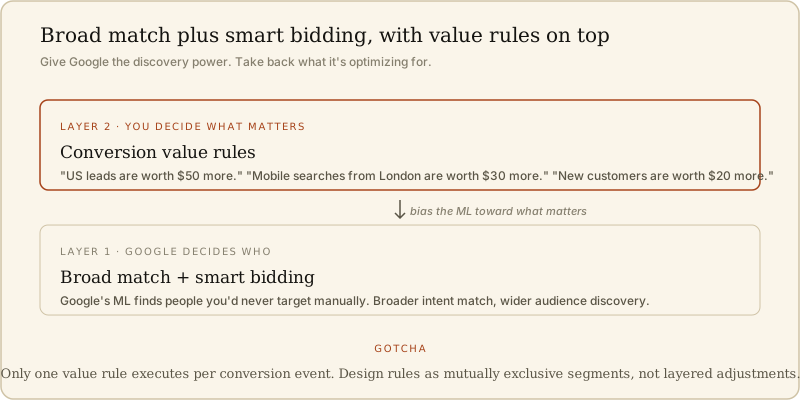
The old debate was manual vs automated. In 2024 you could still run tight manual keyword lists and beat broad match with smart bidding on a lot of accounts. In 2026 you can't. Broad match plus smart bidding is now the correct default on almost every campaign. Google's ML has enough signal to find people you'd never find manually.
The common pushback: "if I let Google decide, it'll waste budget on people I don't want." That's a real risk, but the fix isn't manual keyword lists. The fix is conversion value rules.
Conversion value rules live inside your ad account under Goals > Conversions > Value rules. They let you tell Google that a conversion from certain conditions is worth more than the default. Conditions include location, device, audience segment, and customer attributes. So instead of manually restricting who Google can show your ad to, you tell Google "a lead from the US is worth $50 more than a lead from India, please spend accordingly."
Two gotchas worth naming up front:
- Only one rule can execute per conversion event. If you set up overlapping rules, only one will fire. You have to think of your rules as mutually exclusive segments, not layered adjustments.
- Value rules apply to Performance Max, Search, Shopping, Hotel, and Display. They don't affect Discovery or Video campaigns.
The mental model that keeps me out of trouble: Google's smart bidding is very literal. It optimizes for the value you tell it a conversion is worth, and if you tell it every conversion is worth the same, it will chase whichever conversions are cheapest to acquire, which is often the wrong pool. Value rules are how you influence what Google prioritizes without giving up the discovery power that broad match gives you.
If you only make one change from this whole post, make this one. It's the highest-ROI shift in the list.
The attribution gap that changes how you should read every Google Ads number
This is the one that reframes everything else. Every Google Ads account I've looked at in the last year is being optimized on numbers that are systematically wrong.
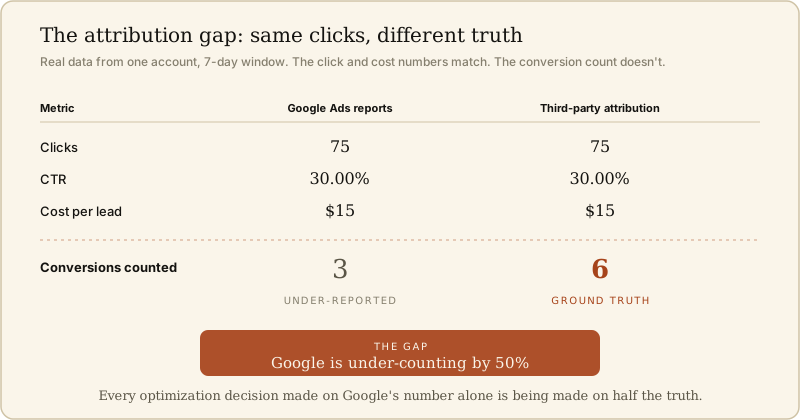
Real data from an account I was reviewing recently. Same seven-day window. Same campaign. Same 75 clicks. Same 30% CTR. Same $15 cost per lead. But the conversion counts came back different depending on which system you looked at:
- Google Ads reported: 3 conversions
- Third-party attribution tool reported: 6 leads
Google was under-reporting by 50%.
That specific 50% gap isn't universal, but the direction of the gap is. Google's own conversion tracking is missing conversions because of iOS privacy changes, cross-device journey gaps, in-app conversions that don't flow back cleanly, and the general erosion of third-party cookies. The exact percentage varies by account, but every account I've cross-checked in the last twelve months has a real gap.
The consequences are large:
- Campaigns that "look like they aren't converting" in Google Ads may actually be converting fine. You've been turning off winners.
- Your target CPA or ROAS is being calibrated on incomplete data. Google's smart bidding is optimizing for 50% fewer conversions than actually happened.
- Attribution decisions between channels (Google vs Meta vs organic) are being made on numbers where Google is under-counted, which biases your budget away from Google.
The fix isn't complicated: run any decent third-party attribution alongside Google Ads. Hyros, Northbeam, Triple Whale, whichever fits your stack. Then use the third-party numbers as the source of truth for optimization decisions and treat the Google Ads number as a directional signal, not the ground truth.
If you haven't done this, do it before you touch anything else. Every other optimization in this post is downstream of getting the numbers right.
Try AI Max campaigns early
AI Max is Google's newest campaign type. It's still in beta for most accounts, which is exactly why it's worth adopting now.
The concrete feature to enable inside AI Max is final URL expansion. With it on, Google can serve your ads pointing to different URLs on your site depending on the query it matched. Instead of every ad in a campaign going to one landing page, Google picks the best-matched page from your site for each query.
The trade-off is real. You give up direct control over which page each click lands on. In exchange, Google gets better at matching intent to landing page than a human building a campaign structure can. On the accounts I've tested this on, click-through rates improve modestly (5-10%) and conversion rates on the same traffic improve more (15-25%), because the traffic actually lands somewhere relevant to what they searched.
My rule: enable AI Max plus URL expansion on 20-30% of your budget for four weeks. If the third-party attribution numbers hold up or improve versus your existing structure, roll it out to more. If they degrade, roll it back.
The reason to move now instead of waiting: early adopters of every Google campaign type get better ML training data flowing through the account for the first six to twelve months. That head start compounds. The accounts that wait until AI Max is out of beta will spend the next year trying to catch up on training signal.
Customer match with high-value tags
The default optimization behavior of Google's smart bidding is to remarket heavily to your existing customers, because that's where the cheapest conversions live. It makes Google's numbers look great and quietly stalls your growth, because you're not acquiring net new customers.
The fix is a two-layer play:
- Upload your full customer list to Google as a Customer Match audience.
- Take the top 10-20% by lifetime value and tag them as "high-value" inside customer match.
Then in your bidding settings, tell Google two things: bid more for net-new customers (people not on your customer list), and bid even more for net-new customers who look similar to your high-value segment. Concrete numbers I use, adjusted to your LTV:
- New customer: worth $20 more than a returning conversion
- New high-value-lookalike customer: worth $80 more
The economics work if your top-decile customer LTV is meaningfully higher than your average customer LTV, which is true in most SaaS and most e-commerce categories.
This is another place where Google's literalness works for you if you set it up right. Google will happily go find high-value lookalikes if you tell it they're worth more. The mistake most accounts make is treating every conversion as equally valuable when the top 10% of customers drive most of the revenue.
Location targeting: change the default that costs local businesses money
This one is a hygiene fix that shows up in every local-business audit I've done in the last year.
When you set up a Google Ads campaign and pick a location, the default targeting option is "Presence or interest: people in, regularly in, or who've shown an interest in your included locations."
For a local business, that "or interest" part is a killer. It includes:
- Tourists who searched for information about your city last month
- Students planning where to move next year
- Ex-residents who still follow local news
- Anyone planning a trip to your area
You pay for all of them. None of them will book your plumbing service.
Change the setting to "Presence: people in or regularly in your included locations." Takes ten seconds. Instantly cuts the wasted-spend pool.
While you're in there, be honest about how wide your catchment actually is. A real example from the location picker: "Oxford (city)" has a reach of 626k people. "Oxfordshire" (the county) has 1.57M. "England" as a whole has 63.9M. Every step up the hierarchy multiplies the waste for a business that only serves a specific catchment.
If you're targeting a country when your business actually serves a city, you're not "casting a wider net." You're paying to advertise to sixty million people who will never become customers.
Ad copy: how to escape the LLM copy convergence
Every serious Google advertiser is now using AI to draft their ad copy. The problem is that everyone is using the same tools with the same generic prompts, so all the outputs converge on the same recommended headlines and descriptions.
Go search any competitive term in Google. Look at the top three ads. The headlines are almost interchangeable. Same value props, same phrasing, same call-to-action structure. When every ad reads the same, none of them stand out, and the CTR of the whole category drops.
The fix is to explicitly ask your LLM for uniqueness. Two prompts I use:
"What can I truthfully say in this ad that no competitor in this space could say?" This surfaces the specific credibility indicators that are unique to your business: total ad spend to date, specific well-known clients, unusual credentials, physical footprint, years running.
"Give me ten ad headlines that break the pattern of what everyone else in this category is saying. Prioritize being unexpected over being safe." This forces the model to move away from its convergence-toward-generic default.
Real example from an account I run: instead of "Grow your Google Ads results" (the generic version), we're using "The Google Ads program run by an operator who's spent $300M+ across paid channels." Same core promise, radically different signal to the searcher. CTR moved by roughly 40% inside three weeks.
The bar isn't "make everything unique." The bar is "make one headline and one description unique per ad group." That's usually enough to break the convergence in the top-of-funnel results Google shows to a fresh searcher.
Fill every asset slot Google recommends
The last shift is the most boring and the most consistently ignored. When you build a responsive search ad, Google's UI shows you a checklist of recommended asset types. Most accounts I audit fill maybe half of them.
Everyone fills:
- Headlines (usually not enough of them)
- Descriptions
- One or two site link extensions
Almost nobody fills:
- Callout extensions
- Structured snippets
- Promotion extensions
- Image assets
- Business logo
- Price extensions
- Location extensions (even when applicable)
Google explicitly prioritizes accounts that fill more slots because more assets give the ML more variations to test and pick from. Ad rank goes up. Impression share improves. Your CTR on the same query goes up because Google can serve a richer ad against your competitors' bare-bones ones.
This is a two-hour fix. Go through every campaign, fill every applicable asset slot. Don't overthink the copy for the extensions, just get them in. You can improve them later. The bigger win is getting Google to promote your ad above competitors who haven't done this yet.
What I'd fix first if I were rebuilding an account
If I inherited a Google Ads account tomorrow and had one week to improve it, the order I'd work in:
- Attribution first. Wire up a third-party tool and get honest numbers before you make any optimization decisions. Everything else is calibrated to bad data until this is done.
- Value rules second. Set up conversion value rules for your top 2-3 conditions (location or audience). Give Google the ability to prioritize what actually matters.
- Customer match third. Upload your customer list, tag high-value, adjust bids.
- Location hygiene, asset coverage, ad copy uniqueness. In parallel, spend two hours knocking these out across every campaign.
The first three are where the economics of the account actually change. The rest are hygiene, but hygiene compounds. Six months from now the account with hygiene wins is materially better than the account without.
If you want to see the wider stack I run around Google Ads (attribution, agent-driven copy testing, spreadsheet-based signal monitoring), the current AI stack lives here. More posts in this shape live in Writing.