Most Google Ads accounts I audit have a rule buried in the ops manual: kill any campaign whose CPA runs above target for 14 days. It's a defensible rule most of the time. It also blocks the single best play I've seen for lifting an entire account: run a competitor-intent campaign that looks bad on paper and let it keep running anyway.
The setup takes about 20 minutes. The counterintuitive part is that the campaigns you launch to run this play won't hit your CPA target. They almost never do. What they do is lift performance across every other campaign in the account, because you're now bringing warmer traffic into the top of your funnel from people who've already validated the problem you solve.
Here's the exact wiring.
Setting up competitor-intent audiences (the actual step-by-step)
Inside Google Ads, go to Tools > Shared library > Audience manager > Custom segments. Create a new audience and scroll to Expand segment by also including. There are a handful of options here. The one that matters is People who browse types of websites.
Drop your competitors' URLs in. This is the audience Google will use as a signal to find people who behave like they've been browsing those sites. It isn't a lookalike or an interest segment. It's Google saying, "here's the pattern of behavior I associate with people who visit these URLs, go find more of them."
Name the audience something you'll recognize six months from now. Save it. That's the whole targeting side of the setup. Every campaign in this play uses that audience as its signal.
The reason this works: intent is already there. Someone browsing your competitor's site has done the research. They know they have the problem and they've narrowed to a category. Everything left is a comparison and a switch. That's a very different starting point from cold interest targeting.
The two-campaign structure that makes this work
One campaign isn't enough. This is where most people running this play get stuck, so I want to be specific.
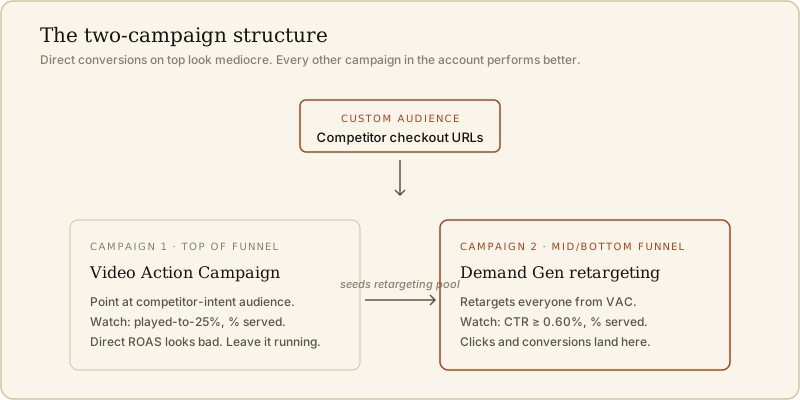
Campaign 1: Video Action Campaign (top of funnel). This is the older YouTube campaign type. Point it at your competitor-intent audience. The creative here is your best top-of-funnel video, hooks front-loaded, spelling out the problem your competitors are also trying to solve. You want impressions on the right people and remarketing pool signups. Clicks come in the next campaign.
Campaign 2: Demand Gen campaign (middle and bottom of funnel). This one retargets everyone who saw your VAC campaign, plus your existing site visitors. Creative here is comparison content, offer-driven creative, direct product demos. This is where the clicks and conversions actually happen.
The first campaign feeds the second. That's the whole point. Running only the Demand Gen campaign gives you decent retargeting but no new-to-brand reach against competitor-intent traffic. Running only the VAC campaign gets your creative in front of the right people but leaves the closing move on the table.
Why direct ROAS is the wrong metric here
Every time I hand this play to a client, we have the same conversation two weeks in. "The competitor-intent campaign is barely converting. Should we turn it off?"
No. The competitor-intent campaign is the top of a stack. It brings warm traffic in. The middle and bottom of the funnel is where the money closes. If you shut off the top of the funnel because it doesn't convert directly, you'll watch the middle and bottom degrade over the next four to six weeks, and you won't know why.
The clean way to see this is to look at account-level metrics, not campaign-level ones. Total new leads, blended CAC, aided brand search volume. When this play is working, all three move in your favor even while the campaign running it looks mediocre in isolation.
The metrics you should actually watch
Different metrics matter at different stages. Two per campaign.
Top of funnel (VAC):
- Video played to 25%. Target 30% or better. If less than 30% of viewers make it a quarter of the way in, your hook is wrong. Rewrite the first 5 seconds and retest. This is upstream of everything else.
- Percentage served. This tells you which of your video creatives Google is actually pushing. High-percentage-served videos are the ones the algorithm has decided are worth distributing. Take those, produce three variants of each, feed them back in.
Middle and bottom of funnel (Demand Gen):
- CTR. Google can auto-scale videos above a 0.60% CTR. Below that, your placements will underperform even with great creative. Cut anything sitting under 0.60% for more than a week.
- Percentage served, again. Same logic. Chase the creative Google wants to distribute.
Notice I didn't say to look at CTR on the top of funnel. Video Action Campaign creatives on YouTube rarely get clicks on first or second impression. That's expected. Chasing clicks at the top will push you to lower-intent placements. Focus on played-to-25% and percentage served instead.
Advanced: use the checkout URL, not the homepage
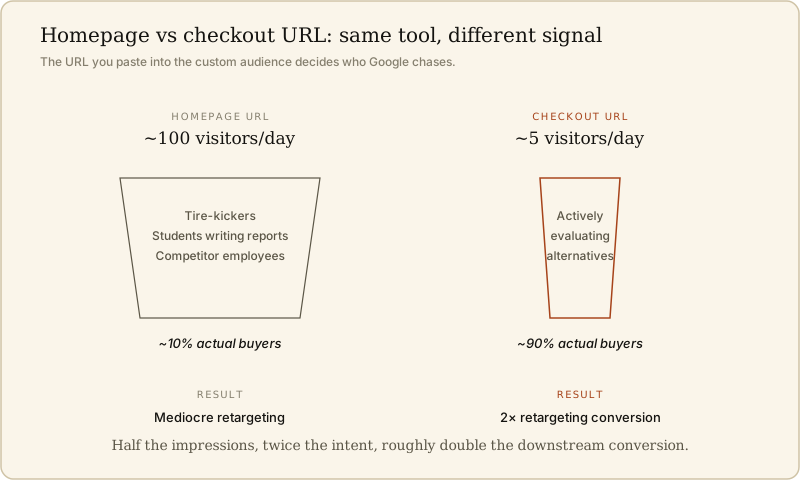
Here's the part most people miss. When you're adding competitor URLs to the custom audience, use the checkout URL, the pricing page, or the "start free trial" page. Skip the homepage.
If a competitor's homepage draws 100 visitors a day and their checkout draws 5, the checkout audience is more concentrated on people who are actively evaluating. That's who you want. The homepage audience includes tire-kickers, students writing reports, and competitor employees. The checkout audience is 90% buyers.
You get this by opening a private browsing session, walking through the competitor's checkout flow as far as you can go without buying, and copying the URLs at each step. Some of those pages will be gated. That's fine. The public ones are enough.
The concentration effect is real. On the account I ran this play on last quarter, swapping homepage URLs for checkout URLs cut the impressions in half and roughly doubled the downstream conversion rate on the retargeting side.
Where this fits in an AI-native paid stack
The reason I like this play in 2026 is that most of the setup is now cheap in a way it wasn't three years ago.
- Audience research used to require a paid tool like SparkToro or a lot of manual scraping. Now, a Claude research agent can pull a competitor's checkout flow, their comparison pages, and their common review-site placements in about 20 minutes.
- Creative production used to be the bottleneck. Now, the pipeline of "one hook idea → three video variants → three thumbnail options" is a Sunday afternoon of work with the right agent chain.
- Testing cadence used to require a manual review of 15 metrics per campaign per day. Now, an agent can flag the drift and hand me the two metrics I actually need to make a call on.
That's roughly the loop I run on my own work. If you want the wider view of the tools underneath it, the current stack lives here. What one operator plus a few agents can actually put out is spelled out on the home page section a little further down, and longer breakdowns of AI-native marketing motions live in Writing.
The competitor-intent play is a specific example of a broader pattern. The playbooks that get better with more AI in the loop are the ones that used to be bottlenecked by human research and creative production. The playbooks that get worse are the ones that relied on scarcity of information. Google Ads competitor-intent targeting is the first kind. That's why it's still working, and why it's likely to keep working through 2026.